AI Maintenance and Support Costs: What to Budget After Launch
AI maintenance cost is the money you spend after launch to keep an AI system accurate, available and affordable, and teams commonly plan it at roughly 15% to 30% of the original build cost every year. Most budgets cover the build and then get surprised in year two by token bills, retraining work and support tickets. If you already understand LLM deployment in production, you know launch is the starting line, not the finish. This guide breaks down every post-launch cost bucket, shows sample year-two budgets, and explains how to cut run costs without hurting quality.
Short answer: budget for five buckets after launch: monitoring, retraining, infrastructure, API or token usage, and support. A system that cost $100,000 to build typically needs $15,000 to $30,000 a year to stay healthy, and usage-heavy LLM products can run higher. The exact figure depends on traffic, how fast your data changes, and how much uptime your business needs.
What AI Maintenance Cost Actually Covers
AI model maintenance is every recurring task that keeps a live AI system performing as well on day 400 as it did on day 1. Unlike traditional software, an AI system can degrade without a single line of code changing. The data it sees shifts, user questions evolve, upstream APIs get updated, and the model quietly gets worse.
That is why AI maintenance cost is a different line item from normal software upkeep. A typical web application needs bug fixes, security patches and hosting. An AI application needs all of that, plus ongoing measurement of answer quality, periodic retraining or prompt tuning, and spend control on every model call.
What it does not include
New features, new use cases and major re-platforming are enhancements, not maintenance. Mixing them together is the most common reason AI budgets look inflated or, worse, get cut: finance sees one big number and cannot tell what is keeping the lights on versus what is growth. Keep run costs and improvement costs in separate lines from the first day.
Why AI total cost of ownership matters
AI total cost of ownership (TCO) is the build cost plus every run cost across the system's useful life, usually three years. A cheap build with an expensive run profile can cost more over 36 months than a well-engineered build that cost 30% more up front. When you compare vendors or approaches, compare TCO, not just the quote.
The Five Post-Launch Cost Buckets
Every AI system spends money in the same five places after launch. The mix changes by project type, but you should price all five before you sign off on a go-live budget.
1. Monitoring and evaluation
Monitoring is the cheapest bucket to fund and the most expensive to skip. It covers dashboards for latency, error rates and cost per request, plus automated evaluation sets that score answer quality every week. For LLM products it also includes guardrail checks, hallucination sampling and human review of a small share of conversations.
Expect this to be a fixed monthly cost of tooling plus a few engineering hours per week. Our guide to AI model monitoring best practices walks through what to track and how often. Teams that invest here early find regressions in days instead of quarters, which keeps every other bucket smaller.
2. Retraining and model updates
Data drift and concept drift are why models decay. A fraud model trained on last year's patterns misses this year's tactics, and a support bot trained on old product docs gives outdated answers. Retraining refreshes the model with recent data; for retrieval-based systems, the equivalent is re-indexing documents and updating embeddings.
Budget for retraining on a schedule (quarterly is common) and add a contingency for unplanned refreshes after a major product or market change. Costs include data labelling, compute for training runs, validation, and a safe rollout.
3. Infrastructure
Infrastructure covers cloud compute, GPUs for self-hosted models, vector databases, object storage, queues, networking, and logging. It is the bucket finance understands best because it appears on the cloud bill, but it is also the easiest to over-provision.
Self-hosted open models trade per-token fees for fixed GPU costs, which wins at high, steady volume and loses at low or spiky volume. Right-sizing instances, autoscaling and caching often cut this bucket by a quarter or more without touching quality.
4. API and token usage (LLM running costs)
LLM running costs are the fastest-growing line for most products built on hosted models. Every user message, every retrieved document chunk and every long system prompt is billed in tokens, and success makes the bill grow. A chatbot that doubles its traffic doubles its model spend.
Three things drive the number: tokens per request, requests per month, and which model tier you call. A workflow that routes easy questions to a small model and hard ones to a larger model can cost a fraction of one that sends everything to the flagship model.
5. Support, SLAs and security
Support covers the people and process behind the system: incident response, bug fixes, dependency and security patches, access reviews, compliance evidence, and a named contact who answers when production breaks. AI support services are usually sold as a monthly retainer with a defined response time, for example four business hours for critical issues.
The price scales with the SLA. Business-hours coverage with next-day response costs far less than 24/7 coverage with a one-hour response, so match the SLA to the cost of downtime, not to what sounds safest.
How Much Should You Budget: Annual Run Cost as a Share of Build Cost
A practical planning rule is to reserve 15% to 30% of the original build cost per year for AI maintenance and support. The low end fits stable, low-traffic systems with slowly changing data. The high end fits LLM products with heavy usage, frequent knowledge updates or strict uptime requirements.
The ranges below are planning estimates drawn from common delivery experience, not quotes. Use them to sanity-check a vendor proposal, then replace them with figures from your own traffic and data.
System type
Rule-based or classic ML model
Annual run cost (share of build)
10% to 20%
Main cost driver
Retraining and data pipelines
System type
RAG chatbot or knowledge assistant
Annual run cost (share of build)
20% to 35%
Main cost driver
Token usage and re-indexing
System type
AI voice agent
Annual run cost (share of build)
25% to 40%
Main cost driver
Per-minute telephony and model fees
System type
Computer vision inspection
Annual run cost (share of build)
15% to 25%
Main cost driver
Camera hardware, edge compute, relabelling
System type
Custom or fine-tuned model
Annual run cost (share of build)
20% to 30%
Main cost driver
Retraining runs and GPU hosting
System type
Multi-agent workflow
Annual run cost (share of build)
25% to 40%
Main cost driver
Multiple model calls per task, evals
Why the range is so wide
Four variables move your number more than anything else. Traffic volume decides token and compute spend. Data volatility decides how often you retrain or re-index. The SLA decides the support price. And architecture decides how much of the bill is fixed versus variable.
A system with unpredictable usage should be budgeted with a variable component that scales with volume, plus a fixed monthly floor for monitoring and support. If you want a view of where run cost sits against the build, compare it with the figures in our AI development cost guide, which covers build ranges by project type.
Sample Year-Two Budgets by AI Project Type
The table below turns the five buckets into illustrative annual budgets for four common systems. All figures are in US dollars, rounded, and meant as a template to adapt, not as a price list.
Project type
RAG chatbot (10k conversations a month)
Build cost
$60,000
Monitoring
$3,000
Retraining
$3,000
Infrastructure
$4,000
Usage fees
$6,000
Support
$4,000
Annual total
$20,000
Share of build
33%
Project type
AI voice agent (20k minutes a month)
Build cost
$80,000
Monitoring
$4,000
Retraining
$3,000
Infrastructure
$5,000
Usage fees
$12,000
Support
$6,000
Annual total
$30,000
Share of build
38%
Project type
Computer vision inspection (one line)
Build cost
$120,000
Monitoring
$5,000
Retraining
$6,000
Infrastructure
$7,000
Usage fees
$1,000
Support
$8,000
Annual total
$27,000
Share of build
23%
Project type
Custom fine-tuned model
Build cost
$150,000
Monitoring
$6,000
Retraining
$12,000
Infrastructure
$14,000
Usage fees
$2,000
Support
$9,000
Annual total
$43,000
Share of build
29%
How to read the table
The chatbot and the voice agent spend the most on usage fees because every conversation or minute is metered. Their bills grow with adoption, so finance should treat usage as a variable line with a monthly cap and alert.
The computer vision system barely touches usage fees but needs steady spend on relabelling and edge hardware, since factory lighting, parts and defect types change. The custom model carries the heaviest retraining and hosting cost because you own the whole stack.
Hidden Costs That Break AI Total Cost of Ownership
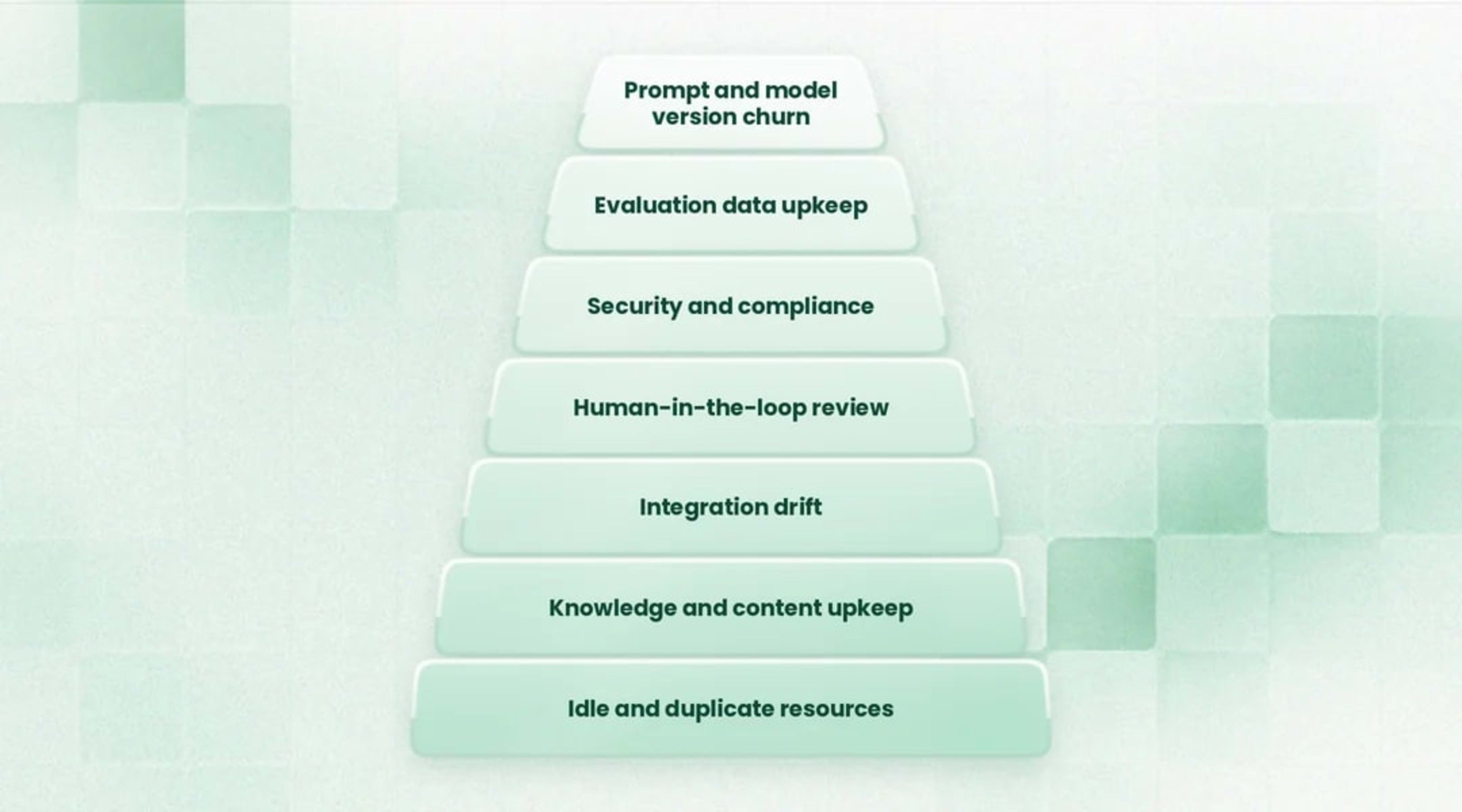
The five buckets cover the visible spend. These hidden items are the ones that turn a reasonable budget into an overrun, and they belong in any honest AI total cost of ownership model.
Prompt and model version churn. Providers retire model versions and change behaviour. Each forced migration needs regression testing and prompt rewrites, often one to three weeks of engineering a year.
Evaluation data upkeep. Your test set goes stale as the business changes. Refreshing it quarterly costs little and protects every decision you make from it.
Security and compliance. Penetration tests, access reviews, data-retention audits and, where relevant, GDPR or SOC 2 evidence collection recur every year.
Human-in-the-loop review. If staff review low-confidence answers or approve sensitive actions, their time is a real run cost even though it never appears on a cloud bill.
Integration drift. The CRM, ticketing tool or ERP your AI connects to updates its API. Each change can break a workflow silently.
Knowledge and content upkeep. A RAG assistant is only as current as its documents. Someone must own adding, retiring and fixing source content.
Idle and duplicate resources. Test environments, unused GPU instances and forgotten vector indexes keep billing quietly.
Calculating a three-year view
To estimate AI total cost of ownership, add the build cost to three years of run cost and include a 5% to 10% annual allowance for model migrations and price changes. Then divide by the business value the system produces. If the system saves 6,000 support hours a year or recovers a measurable share of lost orders, the run cost is easy to defend. If you cannot name the value, fix that before debating the cost.
How to Cut AI Run Costs Without Hurting Quality
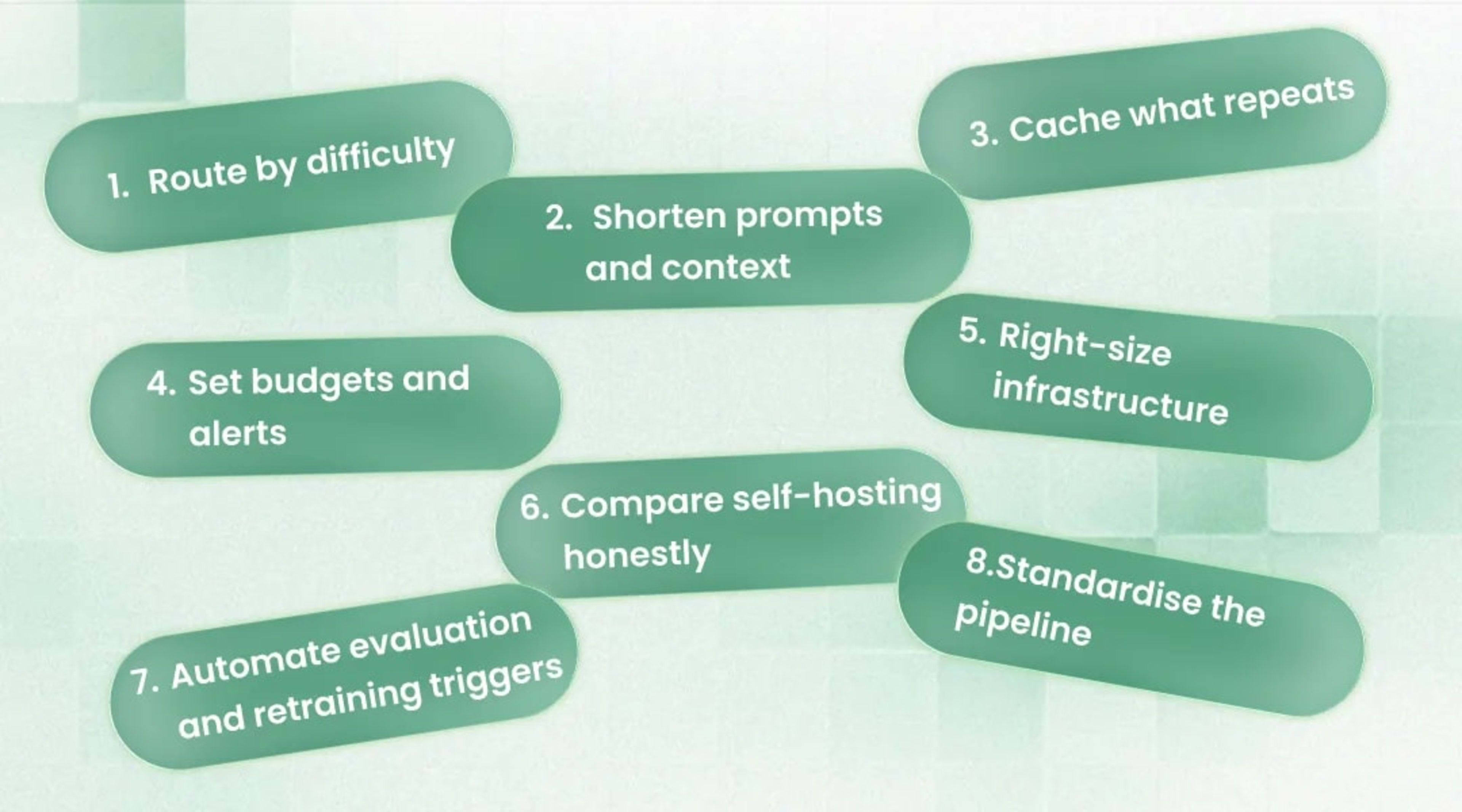
Many AI systems carry avoidable run cost in the first year. The savings come from engineering choices, not from cutting monitoring or support, so the order below goes from safest to most involved.
Route by difficulty. Send simple requests to a small, cheap model and reserve the large model for hard ones. A router with a confidence check often cuts model spend by a third or more with no visible quality loss.
Shorten prompts and context. Trim system prompts, retrieve fewer but better chunks, and summarise long conversation history. Fewer tokens per request is the most direct lever on LLM running costs.
Cache what repeats. Cache answers to frequent questions and reuse provider-side prompt caching where it is offered. Support and FAQ workloads often have a high share of repeated queries.
Set budgets and alerts. Cap spend per day, per customer and per feature, and alert at 70% of the cap. A single runaway loop or abusive user can burn a month of budget overnight.
Right-size infrastructure. Autoscale to demand, shut down idle environments, and use reserved or spot capacity for predictable and batch workloads.
Compare self-hosting honestly. Self-hosting an open model only pays off at high, steady volume. Include the engineers who run it, not only the GPU bill.
Automate evaluation and retraining triggers. Retrain when a metric crosses a threshold rather than on a fixed calendar if your data is stable. You pay for retraining only when it is needed.
Standardise the pipeline. Shared deployment, logging and evaluation tooling lets one small team look after several systems. This is the core idea behind professional MLOps and LLMOps services, where automation replaces repeated manual work.
What not to cut
Resist cutting evaluation, monitoring and security patching to hit a number. They are the cheapest insurance in the budget. If a cut forces you to find problems from customer complaints instead of dashboards, you have not saved money, you have moved the cost to your reputation.
What to Ask an AI Partner to Include in a Support Agreement
A good AI support agreement states what is covered, how fast problems get fixed, and who pays when usage changes. Vague retainers are where year-two disputes start. Use this list when you review any proposal for AI support services.
Scope and responsibilities
Which systems, environments and integrations are covered, and which are excluded.
Whether model monitoring, evaluation runs and monthly quality reports are included.
How many retraining or re-indexing cycles per year are included, and what an extra cycle costs.
Who handles provider model deprecations and the resulting prompt and test updates.
Service levels
Response and resolution times by severity, with business hours or 24/7 coverage stated clearly.
Uptime and latency targets, and the credit you receive if they are missed.
An escalation path with named roles, not only a shared inbox.
Cost control and transparency
Usage and infrastructure costs billed at pass-through with a visible breakdown, or capped.
A monthly report showing cost per request, cost per conversation or cost per outcome.
A rule for how pricing changes when volume grows past an agreed band.
Ownership and exit
You own the prompts, evaluation sets, fine-tuned weights and data pipelines.
Documentation and runbooks are handed over, so another team could take over.
A clear notice period and a transition plan if you leave.
Plan Your AI Run Costs Before They Plan You
AI maintenance cost is predictable once you split it into five buckets, measure each one, and review it on a steady rhythm. Budget 15% to 30% of build cost, keep run costs separate from improvements, and protect monitoring and support from cuts.
Want a number for your own system? KriraAI will review your architecture, traffic and data and send an AI run-cost estimate, with the savings we can find. Explore our full range of AI & Software Development Services or contact the KriraAI team to get your estimate.
FAQs
AI maintenance typically costs 15% to 30% of the original build cost per year. A system that cost $100,000 to build usually needs $15,000 to $30,000 annually for monitoring, retraining, infrastructure, model usage fees and support. Usage-heavy LLM products, voice agents and multi-agent workflows sit at the high end, while stable classic machine learning models sit at the low end.
AI model maintenance includes quality monitoring, drift detection, retraining or re-indexing, prompt and model version updates, infrastructure upkeep, security patching, and support with a defined response time. It does not include new features or new use cases, which are enhancement work and should be budgeted separately so run costs stay clear and defensible.
LLM running costs rise because they are billed per token and grow with usage. More users, longer conversations, larger retrieved context and heavier model tiers all increase the bill. Costs also rise when teams add features without prompt optimisation. Routing easy requests to smaller models, caching repeated answers and setting spend caps usually brings the curve back under control.
Most production AI models are reviewed quarterly and retrained when monitoring shows drift or a drop in accuracy. Fast-changing domains such as fraud, pricing or support content may need monthly refreshes, while stable domains may need only one or two cycles a year. Trigger-based retraining, driven by metric thresholds, is usually cheaper than a fixed calendar.
Ask for a clear scope of covered systems, response and resolution times by severity, uptime targets, included retraining cycles, monthly quality and cost reports, and transparent pass-through of usage fees. Also confirm you own the prompts, evaluation sets and pipelines, and that documentation and a transition plan are included, so you are never locked in to one provider.
Founder & CEO
Divyang Mandani is the CEO of KriraAI, driving innovative AI and IT solutions with a focus on transformative technology, ethical AI, and impactful digital strategies for businesses worldwide.