Let me start with a confession.
The first time a client asked me about “AI copilots,” I rolled my eyes.
Not because the idea was bad. But because I’d already seen three automation trends die quietly inside enterprise systems, after expensive pilots, glossy demos, and leadership presentations full of promises.
So when someone says, “We want an AI copilot across our business processes,” I don’t think about models.
I think about reality.
Messy workflows. Legacy systems. People who don’t trust automation. And decision-makers who want ROI, not applause.
Here’s the uncomfortable truth: Most companies don’t fail with AI because the technology is weak. They fail because they integrate it badly.
This guide is for leaders who don’t want experiments. They want systems that actually work.
Let’s clear the fog.
An AI copilot is not a chatbot. It’s not a FAQ bot with better vocabulary. And it’s definitely not a replacement for your team.
An AI copilot is a context-aware digital assistant embedded inside business workflows. It doesn’t sit on the side. It lives inside your systems. Inside your processes. Inside decision moments.
Where chatbots answer questions, enterprise AI assistants participate in work.
They read documents. Interpret data. Draft actions. Suggest next steps. And - crucially - hand control back to humans.
Traditional automation follows rules. RPA clicks buttons. Macros follow scripts.
AI copilots reason.
They combine:
Generative AI for language and reasoning
Process intelligence for workflow context
Enterprise data for accuracy
This is why AI copilots vs chatbots is the wrong comparison.
The right one?
Copilots vs. dumb automation.
One reacts. The other assists.
Big difference.
I’ve watched a pattern repeat across industries.
First, companies automate tasks. Then they automate workflows. Now they’re automating decisions.
And that’s where AI copilots in enterprise suddenly make sense.
Copilots remove friction between thinking and doing. Drafting. Summarizing. Reviewing. Reporting. Minutes turn into seconds.
Good copilots don’t decide for you. They surface context. Highlight anomalies. Suggest options.
When copilots observe workflows, they learn where bottlenecks hide. And where money quietly leaks.
The best employees in your company are not always available. But your data is.
This is why AI copilots for business adoption are rising, not because it’s trendy, but because complexity finally has a partner.
This is where theory meets friction.
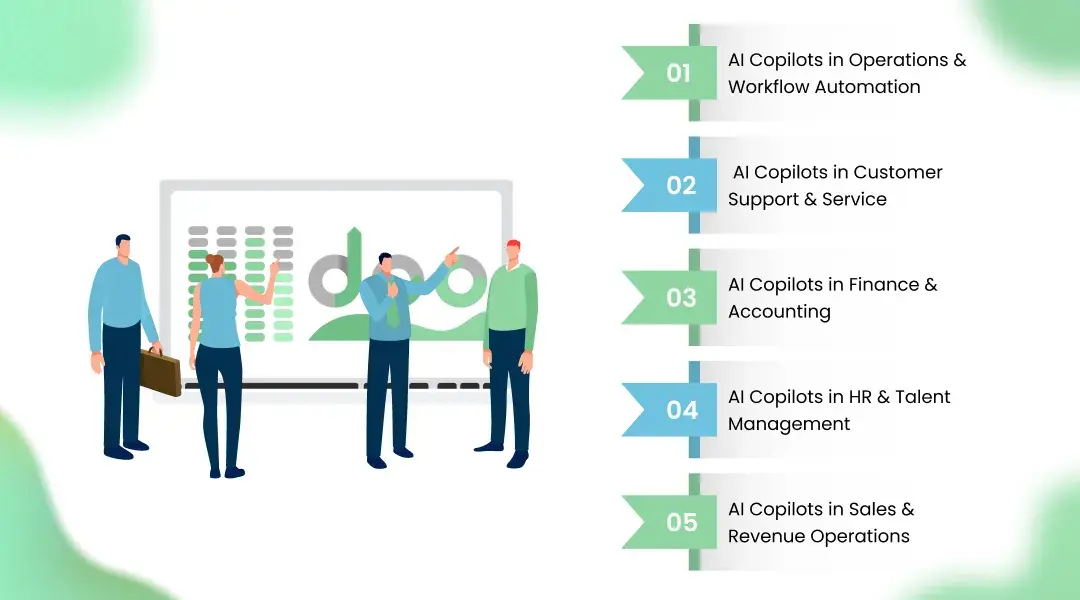
Let me show you where copilots actually earn their salary.
This is the birthplace of value.
In operations, copilots:
Monitor live workflows
Detect delays and anomalies
Suggest re-routing or escalation
Draft operational reports automatically
This is AI copilots for operations at their best. Quiet. Observant. Constantly optimizing.
And yes, this is real business process automation with AI copilots.
Here, copilots:
Summarize customer history in seconds
Draft response suggestions
Flag sentiment shifts
Recommend resolutions
Not replacing agents. Making them faster. Calmer. More consistent.
This is where skepticism usually lives.
Copilots assist with:
Invoice classification
Exception detection
Reconciliation support
Compliance summaries
They don’t approve payments. They make sure humans approve the right ones.
This is how AI copilots in finance avoid disaster.
Recruitment. Onboarding. Performance reviews.
Copilots:
Screen profiles intelligently
Summarize interviews
Draft feedback reports
Track engagement patterns
Done right, this becomes AI copilots in HR that reduce bias rather than create it.
My favorite use case.
Copilots:
Analyze deal pipelines
Draft proposals
Predict churn
Suggest next actions
This is where AI copilots for workflow automation directly touch revenue.
And executives start paying attention.
Let’s talk about outcomes. Not buzzwords.
Less handoffs. Fewer reworks. Faster cycles.
Automation plus decision support equals fewer errors—and fewer expensive corrections.
Context delivered at the moment of choice.
Junior employees suddenly work with senior-level insight.
Processes grow without growing chaos.
This is why integrating AI copilots in business becomes strategic, not tactical.
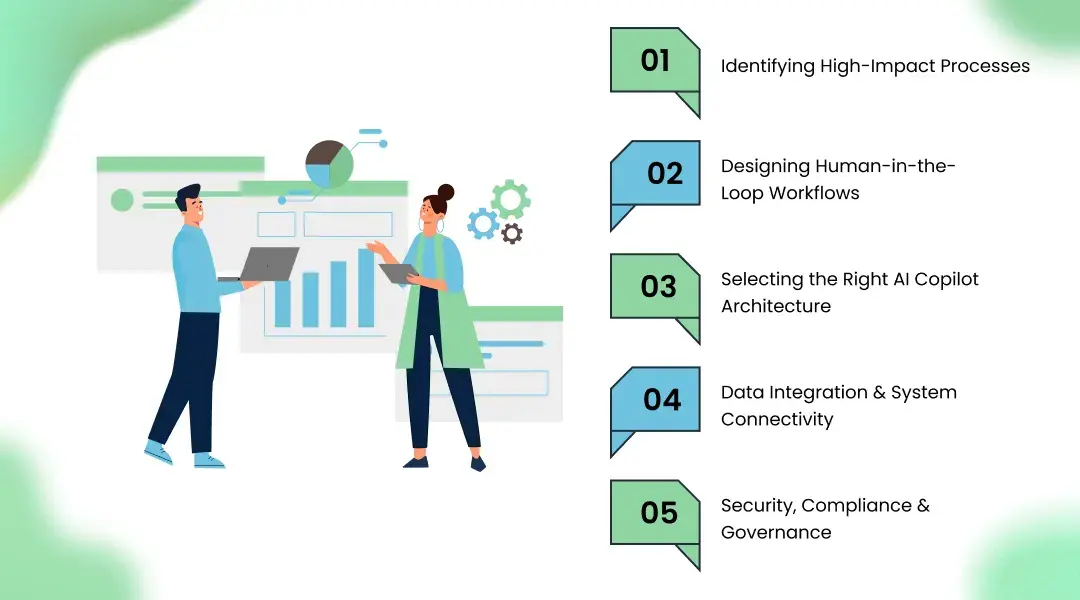
This section separates amateurs from architects.
Start where:
Decisions are frequent
Errors are expensive
Data already exists
Hint: operations, finance, support.
If your copilot can act without review, you’ve already lost control.
Every enterprise system needs:
Suggest → Review → Approve → Execute
This is non-negotiable.
There is no universal copilot.
Some need:
Task-level copilots
Process-level copilots
Decision-level copilots
At KriraAI, we design architectures around workflows, not models. That’s why clients call us a Best AI development Company when integration actually works.
Copilots fail without context.
They must connect to:
ERP
CRM
Document systems
Process engines
No data. No intelligence.
This is where deals die.
Enterprise copilots need:
Role-based access
Audit trails
Encryption
Model governance
Without it, AI copilots implementation never leaves pilot stage.
Let me briefly open the hood.
A serious copilot includes:
Interface layer (UI, chat, embedded panels)
Orchestration layer
Model layer
Data layer
Multiple models. Task routing. Fallback logic.
Structured + unstructured ingestion Real-time + batch access
ERP, CRM, ticketing, workflow engines
Zero trust. Least privilege. Full logging.
This is what secure AI copilots for enterprise actually look like.
Not demos. Systems.
I’ve seen every failure mode.
Garbage input still produces confident nonsense.
Fix the data first.
If workflows change too fast, people bypass the system.
Design for humans. Always.
No unchecked outputs. Ever.
Models must respect data boundaries.
Start small. Measure relentlessly.
This is why enterprise AI copilots succeed only with discipline.
My personal checklist:
Start with pilot use cases
Define measurable KPIs
Build explainability early
Collect continuous feedback
Invest in change management
And partner with teams who’ve failed before.
Experience matters.
AI copilots are not the future.
They’re the present. quietly reshaping how decisions happen, how workflows move, and how organizations scale.
But only when integrated properly.
If you treat copilots like software, you’ll get software results. If you treat them like digital colleagues, you’ll get a strategic advantage.
At KriraAI, we don’t sell copilots. We design systems that survive real business.
And that makes all the difference.
AI copilots are embedded digital assistants that support employees inside workflows by providing context-aware suggestions, automation, and decision support across business processes.
RPA follows rules. AI copilots reason, adapt, and assist humans by interpreting data, language, and workflow context in real time.
Yes, when designed with role-based access, audit trails, encryption, and governance frameworks suitable for enterprise environments.
ROI comes from faster cycle times, reduced errors, improved decisions, and lower operational costs - especially in operations, finance, and support.
Pilot deployments take 6–12 weeks. Full-scale enterprise integration usually spans 3–6 months depending on system complexity.
Founder & CEO
Divyang Mandani is the CEO of KriraAI, driving innovative AI and IT solutions with a focus on transformative technology, ethical AI, and impactful digital strategies for businesses worldwide.