A 2026 report by Roboflow, analyzing over 200,000 computer vision projects, confirmed that vision AI has moved beyond pilot experiments and become a standard component of the operational stack across industries. Yet the overwhelming majority of that adoption is concentrated in enterprises with more than 500 employees. For small businesses with 10 to 50 team members, a massive opportunity sits untouched. The computer vision market is projected to grow at a compound annual growth rate exceeding 15% through the end of this decade, reaching an estimated $43.47 billion by 2031 according to Mordor Intelligence. Despite this explosive growth, fewer than 12% of small businesses have deployed any form of visual AI into their workflows. That is not because the technology is irrelevant to them. It is because almost all guidance, tooling, and vendor marketing has been built for companies ten times their size. This blog changes that.
If you run a small business with 10 to 50 employees in manufacturing, retail, food services, logistics, construction, or any sector where visual data matters, this guide walks you through exactly how computer vision services work at your scale, what they realistically cost, which applications deliver the fastest return, and how to implement them without hiring a data science team. KriraAI has worked with companies at precisely this scale, and every recommendation here reflects what actually works when your budget is measured in thousands rather than millions and your IT team might be one person wearing three hats.
Understanding why computer vision adoption looks so different at this scale requires understanding how these businesses actually operate. A company with 10 to 50 employees typically has annual revenue ranging from $1 million to $20 million. Their technology budget usually sits between 3% and 7% of revenue, which translates to somewhere between $30,000 and $1.4 million annually for all technology spending, not just AI. Most of that budget is already committed to core systems like accounting software, CRM platforms, and industry specific tools.
The decision making structure in these companies is compressed. There is no chief technology officer. There is no AI steering committee. Technology decisions are made by the owner, a general manager, or perhaps a single operations lead who also handles procurement, vendor management, and sometimes the company WiFi. This means any new technology must be explainable in one meeting, justifiable on a single spreadsheet, and implementable without pausing daily operations for weeks.
The team itself is lean by necessity. Every person handles multiple responsibilities. The warehouse manager also does quality checks. The retail floor supervisor also manages inventory counts. The office manager also runs customer communications. This multitasking reality is precisely why computer vision services are so valuable at this scale, because visual tasks that consume human attention are exactly the tasks that steal time from higher value work. But it also means the implementation itself cannot demand significant time from the team. A solution that requires a two month learning curve or a dedicated operator will not survive first contact with reality in a 30 person company.
Technology maturity in these businesses varies widely, but a common thread is that they have functional digital systems without deep technical sophistication. They use cloud based tools, they are comfortable with SaaS subscriptions, and many have basic e-commerce or digital operations. What they typically lack is any experience with machine learning, model training, data pipelines, or the vocabulary of AI development. This gap is not a weakness to overcome through education. It is a design constraint that the right computer vision solution must accommodate from the start.
The enterprise playbook for computer vision deployment involves dedicated data engineering teams, six figure budgets for custom model training, multi-month proof of concept phases, and elaborate governance frameworks. A Fortune 500 manufacturer might spend $500,000 on a single visual inspection system customized for one production line. That approach is irrelevant for a company with 25 employees, and pretending otherwise has held small businesses back from adopting technology that could transform their competitiveness.
At the other end of the spectrum, a solo operator might use a smartphone app powered by Google Cloud Vision or a free tier of Roboflow to solve a single visual task. That works when one person makes all decisions and the only integration needed is between the app and that person's brain. But once you have a team of 10 to 50 people, multiple locations or work areas, and processes that need consistency across shifts and employees, the solo operator approach breaks down. You need something more systematic than a phone app but far less complex than an enterprise deployment.
The realistic budget for a first computer vision project at this scale ranges from $5,000 to $50,000, including hardware, software, and any external consulting. This is enough to deploy a focused solution for one specific use case. The key insight is that cloud based computer vision APIs from providers like AWS Rekognition, Google Vision AI, and Azure Cognitive Services have made the per transaction cost of visual analysis extremely low, often fractions of a cent per image processed. The cost has shifted from the AI itself to the integration work that connects it to your existing operations.
Vendor options at this scale increasingly include no-code and low-code platforms that allow non-engineers to train custom models. Roboflow, Landing AI, and similar platforms have specifically targeted the gap between expensive custom development and limited off-the-shelf APIs. For a small business, this means the barrier to entry is not technical skill but rather clarity about what problem you are solving and what visual data you already have access to.
A small business should expect a first computer vision pilot to take between six and twelve weeks from initial scoping to live operation. This assumes you are using pre-built APIs or no-code platforms rather than training models from scratch. The internal resource commitment is typically 5 to 10 hours per week from one designated person during setup, dropping to less than 2 hours per week for monitoring once the system is running. The person leading this does not need to be a developer. They need to understand the business process being automated and have enough comfort with technology to follow setup guides and interpret results.
KriraAI specializes in bridging precisely this gap for small businesses, providing the technical implementation expertise so that the business owner can focus on defining the problem and evaluating results rather than wrestling with APIs and deployment configurations.
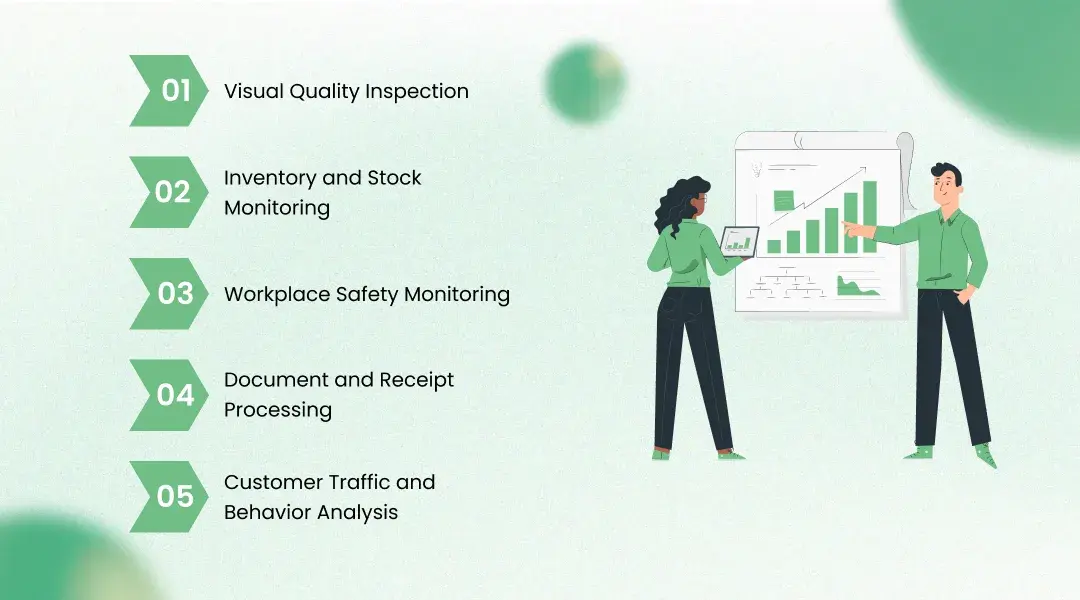
Not every computer vision application makes sense at this scale. The ones that deliver the best return share three characteristics: they replace a task currently done by human eyes many times per day, they work with visual data the business already captures or can easily start capturing, and they produce a binary or simple categorical output rather than requiring complex interpretation. Here are the applications that consistently deliver for companies with 10 to 50 employees.
For small manufacturers, food producers, and fabrication shops, visual quality inspection is the highest ROI application of computer vision. A system using a fixed camera, an edge computing device like a Raspberry Pi or an NVIDIA Jetson Nano, and a trained model can inspect products at a rate that no human team can match. The cost for a single inspection point, including camera, edge device, and software setup, ranges from $2,000 to $8,000. A bakery with 15 employees checking pastry quality, a small electronics assembler verifying solder joints, or a packaging company checking label alignment can expect to catch 30% to 50% more defects than manual inspection while freeing the equivalent of 15 to 20 hours per week in staff time.
Retail shops, restaurants, warehouses, and distributors with 10 to 50 employees spend significant labor hours on inventory counts and stock level verification. Computer vision systems using existing security cameras or purpose installed shelf cameras can monitor stock levels continuously and alert when items need replenishment. Cloud based solutions from providers like Standard AI and Trax Retail start at $200 to $500 per month for small deployments. The time savings typically amount to 8 to 15 hours per week that were previously spent on manual counts, with accuracy improvements of 25% to 40% compared to periodic human counting.
Construction firms, manufacturing shops, and warehouses in the 10 to 50 employee range face real safety compliance challenges. Computer vision can monitor for PPE compliance (hard hats, safety vests, goggles), detect unsafe behaviors (blocked exits, improper lifting), and maintain continuous surveillance that a safety officer doing periodic walkthroughs cannot match. Pre-built safety monitoring solutions from vendors like Intenseye and Voxel typically cost between $300 and $1,000 per camera per month, with most small business deployments requiring two to five cameras. Companies report 40% to 60% reductions in safety incidents within the first six months of deployment.
Small professional services firms, accounting practices, legal offices, and administrative operations process hundreds or thousands of documents monthly. Computer vision powered OCR (optical character recognition) solutions from providers like Nanonets, Rossum, and even built-in features in tools like QuickBooks and Xero can automate invoice processing, receipt categorization, and document classification. These solutions start at $50 to $200 per month for small business volumes and reduce document processing time by 60% to 80%.
Retail stores, restaurants, and service businesses with physical locations can use computer vision to analyze foot traffic patterns, dwell times, queue lengths, and customer flow. These insights drive decisions about staffing schedules, store layouts, and promotional placement. Solutions like RetailNext and Rhombus offer small business tiers starting at $200 to $600 per month per location, using existing security camera infrastructure.
Generic AI statistics about "40% efficiency improvements" mean nothing unless they are grounded in the specific economics of a small business. Let us translate computer vision benefits into numbers that matter at this scale.
A manufacturing business with 20 employees and $3 million in annual revenue that implements visual quality inspection on its primary production line can expect to reduce product defect rates by 35% to 50%. At typical defect costs of 3% to 5% of revenue, this translates to annual savings of $31,500 to $75,000. Against an implementation cost of $10,000 to $25,000, the payback period falls between two and seven months. This is not theoretical. These are the ranges reported by small manufacturers using platforms like Landing AI and Roboflow in production environments.
A retail store with 12 employees spending 20 hours per week on inventory management tasks can realistically reduce that to 6 hours per week through camera based stock monitoring. At average labor costs of $18 to $25 per hour, that saves $14,500 to $24,700 annually. With implementation costs of $3,000 to $8,000, the payback period is three to six months.
For a construction company with 35 employees, safety incident reduction is both a human and financial equation. The average cost of a recordable workplace injury for a small construction firm exceeds $42,000 when accounting for direct medical costs, lost productivity, and insurance premium increases. A computer vision safety monitoring system costing $15,000 to $30,000 annually that prevents even one serious incident per year delivers immediate positive ROI while protecting the people doing the work.
These numbers matter because they are proportional to the business. A $50,000 annual saving is a rounding error for a Fortune 500 company. For a business doing $5 million in revenue, it represents a 1% improvement in margins, which can be the difference between a profitable year and a break even one.
Implementing computer vision services for small business operations does not require a Silicon Valley engineering team. It requires a disciplined, phased approach that respects the resource constraints of a 10 to 50 person company. Here is how to do it step by step.
Phase 1: Problem Identification and Data Assessment (Weeks 1 to 2). Start by listing every task in your business where a human being looks at something and makes a judgment. Quality checks, inventory counts, safety inspections, document sorting, customer counting. Rank these by two factors: how many hours per week they consume and how much it costs when they are done incorrectly. The intersection of high time consumption and high error cost is where your first computer vision project should focus. During this phase, also assess what visual data you already capture. Many small businesses already have security cameras, smartphones used for documentation, or photos taken for record keeping. This existing data often provides enough starting material for a pilot.
Phase 2: Platform Selection and Pilot Setup (Weeks 3 to 6). Based on your selected use case, choose between three paths:
Pre-built cloud APIs (Google Vision, AWS Rekognition, Azure AI Vision) for standard tasks like OCR, object detection, or image classification. Best when your use case matches common categories.
No-code model training platforms (Roboflow, Landing AI, Lobe by Microsoft) for custom tasks where you need the model to recognize objects or defects specific to your business. Best when off the shelf does not match your exact needs.
Managed computer vision services from providers like KriraAI, which handle the full pipeline from data preparation through deployment for businesses that want results without managing the technology themselves. Best when speed to deployment and reliability matter more than learning the technology internally.
During this phase, collect 50 to 200 labeled images for custom model training. As noted by industry experts, modern techniques like transfer learning and small data approaches mean you do not need thousands of images. Fifty well chosen, properly labeled images can produce a model with over 90% accuracy for many business specific tasks.
Phase 3: Testing and Refinement (Weeks 7 to 9). Run your system in parallel with existing manual processes. Compare the AI outputs to human judgments. Identify where the model succeeds and where it fails. Common failure modes include unusual lighting conditions, unexpected object orientations, and edge cases the training data did not cover. Addressing these failures requires adding targeted training images, not starting over.
Phase 4: Full Deployment and Monitoring (Weeks 10 to 12). Deploy the system as the primary method for the targeted task. Establish a simple monitoring routine, checking accuracy metrics weekly for the first month and monthly thereafter. Assign one team member as the system owner who receives alerts and handles exceptions.
The first and most damaging mistake is solving the wrong problem. Small businesses often get excited about the most technically impressive application rather than the one with the clearest ROI. A restaurant owner who installs customer sentiment analysis when their real pain point is inventory waste is spending money on novelty rather than value. Always start with the operational problem, never with the technology.
The second mistake is over-engineering the solution. Small businesses do not need custom neural network architectures or proprietary edge computing clusters. They need a camera, a pre-trained or lightly fine-tuned model, and a reliable way to deliver alerts or data to the people who act on them. Every layer of unnecessary complexity adds cost, adds potential failure points, and adds dependency on specialized skills the business does not have.
The third mistake is treating deployment as the finish line. Computer vision models degrade over time as conditions change. Products look different across seasons. Lighting shifts as bulbs age or fixtures move. New inventory items appear that the model has never seen. A simple monthly review process where the system owner checks a sample of recent outputs against reality prevents this drift from eroding accuracy.
Small businesses face a set of challenges with computer vision that larger companies either do not experience or can easily resource their way through. Acknowledging these honestly is essential for realistic planning.
Data scarcity is the most fundamental challenge. A factory running one production line for three years has far less visual data than a multinational with 200 facilities. Training effective models with limited data requires deliberate strategies. Synthetic data generation, where software creates artificial training images, is one approach gaining traction. Transfer learning, where a model trained on millions of general images is fine-tuned on your specific small dataset, is another. Both of these techniques make computer vision viable with as few as 50 well-curated images rather than the thousands previously required.
Technical support dependency creates vulnerability. When a 30 person company deploys computer vision and something breaks, there is usually no internal capability to diagnose model performance issues, camera feed problems, or integration failures. This makes vendor selection critically important. The right vendor for a small business is not necessarily the one with the most advanced technology. It is the one with responsive support, clear documentation, and a track record of working with non-technical teams. KriraAI specifically structures its support agreements for this reality, providing ongoing monitoring and rapid response because small businesses cannot afford the downtime of waiting in an enterprise support queue.
Privacy and compliance concerns affect small businesses differently than enterprises. A large corporation has legal teams and compliance officers to navigate data protection regulations. A small business owner must understand and comply with the same regulations, including GDPR and evolving AI transparency laws, without dedicated legal resources. Any computer vision system that processes images of people, whether employees or customers, triggers privacy obligations. Solutions that process data on edge devices rather than sending images to the cloud significantly reduce this burden, and small businesses should prioritize edge based architectures whenever feasible.
One of the most consequential decisions a small business faces when adopting computer vision is whether to build a custom solution, buy a pre-built platform, or hire a managed service provider. Each path has distinct cost profiles and risk characteristics at this scale.
Building custom solutions using open source frameworks like OpenCV, YOLOv8, or Detectron2 offers maximum flexibility at minimal licensing cost. However, it requires Python development skills, understanding of model training pipelines, and ongoing maintenance capability. For a small business without a developer on staff, this path typically costs $15,000 to $40,000 in outsourced development with ongoing maintenance costs of $3,000 to $8,000 annually. The risk is that the custom solution becomes an orphan once the developer who built it moves on.
Buying pre-built platform subscriptions (Roboflow, Google Cloud Vision, AWS Rekognition) offers faster deployment and lower upfront cost, typically $100 to $1,000 per month depending on volume. The limitation is flexibility. If the platform does not support your exact use case out of the box, customization options may be limited or require upgrading to enterprise tiers that price out small businesses.
Managed service providers like KriraAI offer a middle path, handling the technical implementation while the business retains control over problem definition and outcome measurement. This approach typically costs $10,000 to $30,000 for initial deployment with monthly management fees of $500 to $2,000. The advantage is that the business gets a solution tailored to its specific operations without needing to develop or maintain internal technical capability.
The cost of deploying computer vision has dropped by approximately 60% over the past three years, driven by more affordable GPUs, edge computing devices, and the proliferation of no-code platforms. Over the next three to five years, this trajectory will continue. By 2028, computer vision capabilities that currently require $20,000 to implement will likely be available for under $5,000. But waiting for lower costs is not a neutral decision. It is a competitive one.
Small businesses that deploy computer vision now gain compounding advantages that go beyond the immediate ROI of any single application. They accumulate proprietary visual data that makes their models more accurate over time. Their teams develop operational fluency with AI-augmented workflows that competitors will need months to replicate. They establish processes for evaluating and adopting new AI capabilities as they emerge, reducing the lag time between technology availability and business benefit.
In industries like manufacturing, food production, and logistics, the quality and consistency advantages of computer vision will increasingly become customer expectations rather than differentiators. Buyers who currently accept occasional defects, inconsistent packaging, or manual documentation will begin requiring the precision that automated visual inspection provides, simply because enough of their other suppliers already deliver it.
The small businesses most at risk are those in the 10 to 50 employee range who compete directly with both larger companies that have already adopted vision AI and smaller, more agile startups that adopt it faster. This middle ground becomes untenable without proactive technology adoption. The competitive window is not five years. For most industries, the next 18 to 24 months will determine which small businesses are positioned to compete in an AI augmented market and which are struggling to catch up.
Three insights from this guide matter more than all others for small businesses considering computer vision in 2026. First, the cost barrier has collapsed. A meaningful computer vision deployment now costs less than a new company vehicle, and it delivers ongoing returns every month it operates. Second, the technical barrier has dissolved alongside the cost barrier. No-code platforms and managed service providers have made it possible for businesses without any AI expertise to deploy production grade visual intelligence. Third, the competitive window is closing. Early adopters among small businesses are already accumulating advantages in quality, efficiency, and operational consistency that will be increasingly difficult for later movers to match.
KriraAI works specifically with small and mid-sized businesses to design computer vision implementations that respect real-world constraints around budget, team capacity, and existing technology infrastructure. Rather than scaling down enterprise solutions or stretching startup tools beyond their limits, KriraAI builds practical, focused systems that solve one clear problem at a time and expand as results prove themselves. If your business processes visual information in any form, whether that is inspecting products, counting inventory, monitoring safety, or reading documents, there is likely a computer vision application that will pay for itself within six months. Reach out to KriraAI to explore which application makes the most sense for your specific operations and what a realistic implementation timeline looks like for your team.
The cost of implementing computer vision in a small business with 10 to 50 employees varies based on the approach and use case, but realistic ranges are $5,000 to $50,000 for a first deployment. A simple cloud API integration for document processing or basic image classification can start at under $5,000 including setup costs, with ongoing subscription fees of $50 to $500 per month. A custom visual inspection system for a small manufacturing line typically falls between $10,000 and $25,000 including cameras, edge computing hardware, model training, and integration. Managed service deployments through providers like KriraAI, which handle the full pipeline, generally fall in the $15,000 to $30,000 range for the initial project. The critical point is that these costs are now accessible to businesses doing $2 million or more in annual revenue, and payback periods of three to seven months are common for well selected use cases.
Small businesses with 10 to 50 employees absolutely do not need a data science team to implement and benefit from computer vision. The landscape of tools available in 2026 includes no-code platforms like Roboflow and Landing AI that allow a technically comfortable operations manager to train, test, and deploy custom vision models without writing any code. Pre-built cloud APIs from Google, AWS, and Microsoft handle common tasks like text extraction, object detection, and image classification through simple API calls that many small business software tools can integrate with directly. For more complex implementations, managed service providers handle the technical work while the business focuses on defining the problem and evaluating the results. The internal requirement is not data science expertise but rather one person who understands the business process being automated and can dedicate 5 to 10 hours per week during the setup phase.
The best first computer vision project for a small business is the one that solves a specific, measurable problem the business experiences daily, not the most technically impressive application. For small manufacturers and food producers, visual quality inspection is consistently the highest ROI starting point because defect detection directly reduces waste, returns, and customer complaints. For retail and restaurant businesses, inventory monitoring through existing camera infrastructure delivers fast results because it replaces a task that already consumes significant staff time. For construction and field services companies, safety compliance monitoring provides both financial and human safety returns. For professional services and administrative businesses, document processing through OCR is the easiest entry point with the lowest implementation cost. The common thread is that the best first project replaces a repetitive visual task that a specific person in the company currently spends multiple hours per week performing.
Small businesses with 10 to 50 employees typically see measurable ROI from computer vision within three to seven months of deployment, assuming the use case was well selected. The timeline breaks down into approximately six to twelve weeks for implementation and then two to four months of operation before cumulative benefits exceed the investment cost. This timeline is faster than what larger enterprises experience because small businesses can make decisions and deploy changes without committee approvals, procurement cycles, or multi-stakeholder alignment processes. The speed advantage of small business decision making is real and significant. A quality inspection system that saves $2,000 per month in defect reduction costs pays back a $10,000 investment in five months. An inventory monitoring system that saves 12 hours per week at $20 per hour delivers $960 per month in labor savings against a typical monthly software cost of $300 to $500. The key variable is not the technology but the clarity with which the business defines success before implementation begins.
Modern computer vision models achieve accuracy levels above 95% for most well defined visual tasks in production environments, and this level of performance is achievable even by small businesses using no-code training platforms with relatively small datasets. For quality inspection tasks like detecting surface defects, verifying label placement, or checking assembly completeness, accuracy rates of 95% to 99% are standard when the training data represents the actual production conditions including lighting, angles, and product variation. This consistently exceeds human inspection accuracy, which typically ranges from 80% to 85% for repetitive visual tasks due to fatigue, distraction, and subjective judgment variation. The important nuance is that accuracy depends heavily on how well the training data matches real world conditions. A model trained on images taken in perfect lighting will underperform when deployed under the fluorescent lights of an actual factory floor. Small businesses should always capture training images in the actual environment where the system will operate and include examples of the full range of acceptable and unacceptable conditions.
Ridham Chovatiya is the COO at KriraAI, driving operational excellence and scalable AI solutions. He specialises in building high-performance teams and delivering impactful, customer-centric technology strategies.